LinkedIn Learning for Students
Introduction:
Hello and welcome back! Today we are going to be discussing the importance of LinkedIn for students and ways that you could improve your profile. For myself, being a student, I am always on the lookout for job opportunities, and wanting to maintain a professional network. Let’s dive right in and get to work on updating your LinkedIn profile! I have attached my profile so that we can see the updates as we go along!

Create a LinkedIn Profile:
The first step is making sure that you have a LinkedIn account, if you already have one then you can skip this step. If you still are a student then make sure that you click yes to making a student account, they will customize your account based on this. LinkedIn allows you to choose exactly what you are looking for, that could either be finding a job, staying up to date with the industry, keeping in touch with contacts, or building a professional network (Schinkten, 2018).
After we have set up your account, next step is to add a profile picture. Schinkten believes that adding a profile picture will allow your profile to receive far more views that those who don’t (Schinkten, 2018). To set this up simply click on the camera icon and select a photo from a file on your computer. Next is to select a background photo. The default blue background works just fine, but if you want to update it click on the ‘update here’ and select a new image so that your profile can stand out even more.
We are so close to getting your LinkedIn profile active, but first you may want to change your headline. This is the first thing that employers will read on your profile, so make sure it is engaging. If you are not a student, most people will have their job title followed by the company. Use something that defines you and what you are going to become. Another good thing to add to your profile is your work experience or volunteering. Recruiters love to see what kind of experience you have.
Now we will move into the most important part of your profile, which is your summary. Schinkten states that he is shocked at how many profiles he views that do not have a profile summary. This is an opportunity to share some of your accomplishments and your mission statement (Schinkten, 2018). To set this up, click on the pencil icon, and add it in. You will want to make sure the first couple lines are eye grabbing and intriguing as those are what are going to show first. Make sure you find the best keywords that work best for you.
Before we move onto building your network, I want to convey that you are going to spend a lot of time creating and improving your profile. You should never stop updating it and make sure to devote attention to it, most of the time your LinkedIn profile is the first thing that recruiters will see when they google your name.
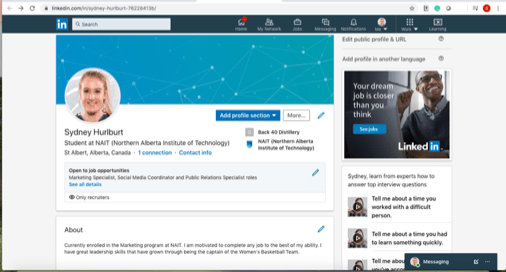
Here is my final LinkedIn profile following those steps. Is it not yet complete but I don’t think that it ever will be fully finished, a key is to keep updating it and adding new information in!
Build Your Network:
The next step that we are going to work on is creating a professional network. This is one of the most empowering things that you can do. Creating a strong network will allow the door for job opportunities to open, and resources to be easily accessible. Schinkten states that two of the most popular ways that companies find new hires are through employee referrals and social professional networks (Schinkten, 2018).
Now that we have our LinkedIn profile finalized, it is time to start connecting with people. Searching for individuals is the easiest way to see their profiles and connect with them. Not only can you search for people, but also companies that you are interested in. A great tip for using your search bar is to look for industry-specific people. Say you just want to see people in the marketing field. You can use an advanced search to just bring up those people.
Lastly, let’s discuss LinkedIn groups. These groups are created by individuals with shared interests and wanting to start conversations with similar people. This is also another great way to network and meet new people. One thing to note about groups is that if you don’t meet the requirements you may not be approved, so making sure your profile is up to date and professionalism is key.
Using LinkedIn Day-to-Day:
LinkedIn news can be accessed by clicking the ‘Home’ icon at the top. Here you can find news articles, suggest new connections and get you thinking about a new industry you might be interested in based on what groups you’ve joined or things you’ve liked. Making sure that you are following companies and individuals that you are only interested in will customize the suggestions. Sharing content that you find interesting is another great way to add value to your network.
Your LinkedIn profile, whether you realize it or not is your digital footprint Schinkten tells us. In this digital age, it is very overwhelming the number of employers who potentially look up candidates online (Schinkten, 2018). So, is your digital footprint showing a positive image of you?
The last thing that we are going to talk about in this section is called ‘LinkedIn learning’. This is a premium feature that allows full access to a library. There are a ton of different information sections that you can access including Business, Creative, Technology, and LinkedIn. This is a great resource tool to advance your skill set and gain new knowledge.
Job Search and Company Research:
Since most of us here are students, LinkedIn is a great starting tool to provide insight that will help us utilize our platform and help us find a job. We just recently talked about using the search bar to find companies that may be in our interest. LinkedIn has over 9 million companies, so exploring their page is a great place to start. (Schinkten, 2018). LinkedIn also allows you to set job alerts so that if any new jobs pop up in your interest, it will send you a notification immediately. This way you aren’t having to always search for the jobs.
Manage Your LinkedIn Account:
Before we wrap up for today, we are first going to talk about some features that can be found on LinkedIn. One of them is a LinkedIn premium. This allows you access to some new content and is able to send InMail. If you aren’t sure if the premium feature is right for you, you can try a free trial. If you are a student like me and don’t have a lot of extra money, the basic LinkedIn is still an extremely powerful tool.
Secondly, you will want to make sure that you update your privacy and settings function. The two most important sections here are the ‘Sharing Profile’ and ‘Profile Viewing’ section. Making sure that these are set to the settings you want is very important for your safety and security.
Conclusion:
Now that we have fully updated your entire LinkedIn profile, you are ready to start exploring and hopefully meeting new people. One last thing that I am going to leave you with is to make sure that you are updating your profile frequently. As you get new jobs, interests or want to branch out into a new industry, make sure that it is always on your profile because you never know who may be exploring your profile!
References:
(2010). Retrieved February 4, 2020, from Linkedin.com website: https://www.linkedin.com/learning/learning-linkedin-for-students/set-up-a-new-linkedin-account?u=2109516
 Sydney's blog